 xerozsoft
 Every angle of your CS2 skin, before you trade it.
Paste an inspect link and see the item in real-time 3D: its paint, its wear, its pattern, its stickers. Rebuilt from the game's own data, not a screenshot.
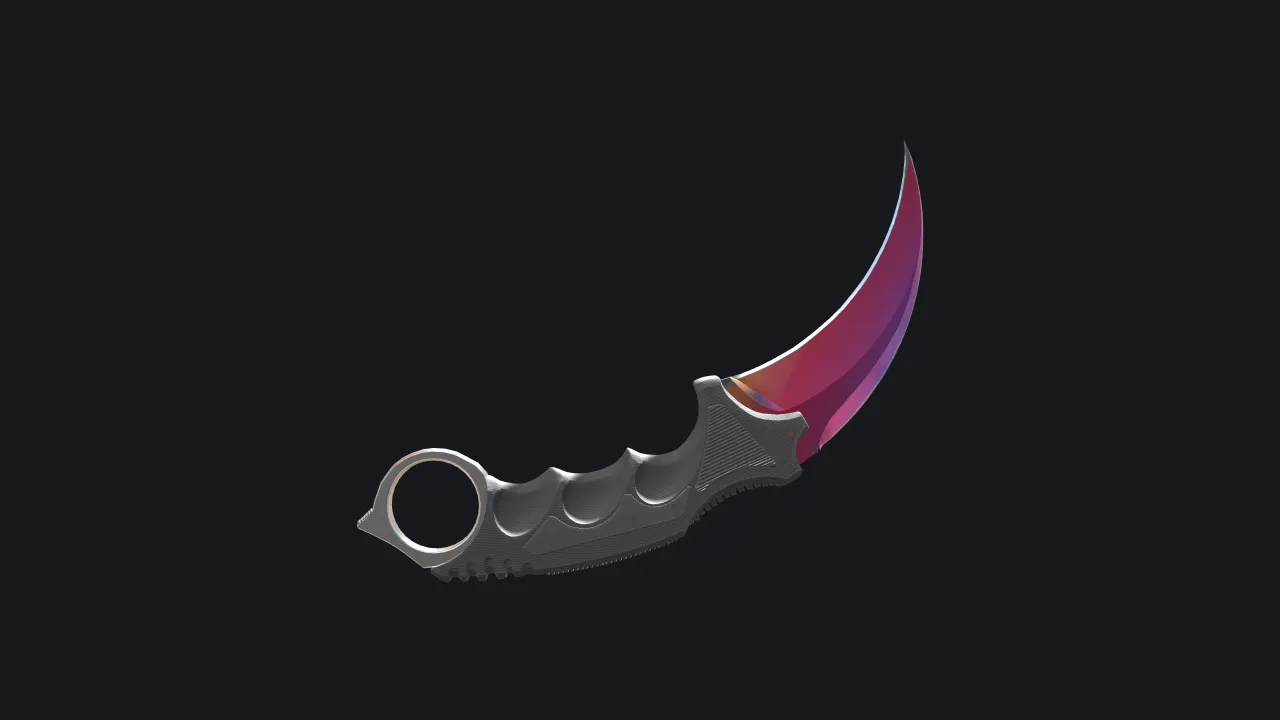
Drag to rotate
Karambit
Fade
- Wear
- Factory New
- Float
- 0.0300
- Pattern
- 412
Real renders from the viewer. Sample items shown with example float and pattern values.
What you can check on a single item.
A screenshot shows one angle in one light. The viewer shows the item.
Paint and wear
The paint kit is composited the way the game does it, and the float drives how worn it looks. Field-Tested reads as Field-Tested.
Pattern seed
Two items with the same name can look very different. The seed decides where the paint sits, so you see this exact item.
Stickers, charms and StatTrak
Sticker placement and wear, charms hanging from the weapon, the StatTrak module and any name tag.
Weapons, knives and gloves
Rifles, pistols, knives and gloves, with the game's own models and the inspect animation.
Your own view
Rotate, pan and zoom freely. Change the lighting, or switch to the game's inspect camera.
From inspect link to 3D in three steps.
No screenshots and no waiting for someone to send you more angles.
- 1
Copy the inspect link
Copy it from the game, a market listing or a trade chat. The full Steam link or just its hex code both work.
- 2
Paste it into the viewer
The viewer reads the item from the link and builds its paint from the game's own recipe.
- 3
Look closer
Turn the item, zoom into the receiver, check the wear and the stickers, and compare lighting.
A year spent matching the game, not imitating it.
The viewer ships no Valve files. It reads the game's own data and rebuilds each item from it. This is what that took, in the order each piece depends on the one before.
- 1
Reading the link
An inspect link is decoded into the item: definition, paint, wear, pattern seed, stickers, charms, StatTrak count and name tag. The checksum is verified.
- 2
Models and animation
Weapon, knife and glove models are read from the game's compiled files, with their attachment points and the inspect animation.
- 3
The paint recipe
Each paint kit's recipe runs on the GPU as the game runs it: pattern offset and rotation, grunge and wear, all rolled from the seed.
- 4
The game's own shaders
CS2's shader programs are translated from Vulkan SPIR-V to WGSL and GLSL, so surfaces are shaded by the same logic as in game.
- 5
Stickers, charms and gloves
Sticker placement and wear, charms swinging on a physics chain, StatTrak modules, and the way a glove sits on the hand.
- 6
WebGPU, with a fallback
The viewer renders with WebGPU by default and falls back to WebGL2 where it has to.
Where it differs: lighting and post-processing follow each map's data and come close to the game's frame, but are not identical.
Early access is open by request.
The viewer is at version 0.1.3. Tell us how you plan to use it and we will get back to you.
- System
- Windows 10 or 11, 64-bit
- Game
- Counter-Strike 2, installed through Steam
- Browser
- Chrome or Edge with WebGPU
- Runs
- On your own PC, from your own game files